 Ngoc Giau T. presents
Raw footage in. Scroll-stopping 9:16 out.
I edit TikTok, Reels and YouTube Shorts: UGC ads, product ads and podcast clips, with a hook in the first 2 seconds and captions checked by hand.
- First cut in 24–48 h
- Revisions included
- 1080×1920
Scene 01Int. Edit bay — Night
The Craft
On a muted feed, captions carry the story. Pick a style and watch the same line cut four different ways.
Red areas get covered by the like buttons, username and caption. Text stays inside the dashed box.
Scene 02Ext. The feed — Day
The Work
Hover to preview, slide across a card to scrub, click to watch with sound. Every sample is a spec ad or practice edit, so you're judging the editing itself. The same edits are in my Upwork portfolio, where you can hire me with Upwork's payment protection.
Scene 03Int. Same footage — Later
Before / After
Drag the gold line. Left of it: the stock clips exactly as downloaded, untrimmed. Right of it: the 25-second ad I cut from them. Press play to run both at once.
- Hook moved to the first 2 seconds
- Dead air cut, shots trimmed to the beat
- Captions, music and sound effects added
Scene 04Int. Edit bay — Director's commentary
The cut, explained
Every cut in this ad has a job. Tap a moment to jump there and see why it's in the edit.
Scene 05Int. Timeline — Continuous
What every cut gets
No add-on menus for the basics. These come with every video, whatever the package.
- I
A hook in the first 2–3 seconds
A text hook, a hard cut or a punch-in zoom. No slow intros, no logo first.
- II
Captions checked by hand
Word-by-word animated captions with keywords highlighted. Spelling and timing proofread before delivery.
- III
Tight pacing
Pauses and filler words removed, jump cuts, zooms and B-roll every few seconds so the video never sits still.
- IV
Clean, balanced sound
Voice cleaned up, music and sound effects mixed under it, never on top of it.
- V
Safe-zone layout
Text placed where TikTok and Reels buttons can't cover it. See the demo.
- VI
Ready-to-post files
1080×1920 MP4 for TikTok, Reels and Shorts, plus 1:1 or 16:9 versions on request.
If the first two seconds don't land, nobody sees the rest. So every cut starts there.
Scene 06Int. Your inbox — Next morning
The Process
Four frames, start to finish. Simple on your side: send footage, leave notes, download the result.
- 01In
You send footage
Raw clips via Google Drive, Dropbox or WeTransfer, plus 1–2 videos whose style you like.
- 02Cut
First version
Usually within 24–48 hours, with the hook, captions, music and sound effects in place.
- 03Notes
Revisions
One or two rounds included, depending on the package. Leave timestamped notes and I adjust until it matches your brief.
- 04Out
Final delivery
Ready-to-post files, and a reusable caption style so your next videos match.
Scene 07Ext. Box office — Now showing
Pick your ticket
Clear prices, booked and paid through Upwork. Or send your brief for a custom quote.
Scene 08Int. Press junket — Day
Questions clients ask first
Something not covered here? Ask me on Upwork before you order.
How do I send you footage?
Share a Google Drive, Dropbox or WeTransfer link in our Upwork chat. Phone footage is fine. Just send the original files, not screen recordings or copies compressed by a messaging app.
What do you need from me to start?
Your clips, 1–2 reference videos you like, and where the video will be posted. Add your logo, fonts or brand colors if you have them. For ads, a short script or the one message you want people to remember helps a lot.
How fast will I get my video?
Starter is delivered in 1 day, Standard in 2 days, and the 5-video Advanced batch in 5 days. Custom projects usually get a first version within 24–48 hours.
How do revisions work?
Leave timestamped notes, for example "0:07, cut this pause", and I adjust the edit. Starter includes 1 round; Standard and Advanced include 2. Extra rounds are +$5 each.
Is the music safe to post?
I use royalty-free music and sound effects and tell you where each track comes from. If the video will run as a paid ad, say so and I'll only use tracks cleared for commercial use.
Can you match my existing style?
Yes. Send a few videos from your account, or from a creator you like, and I'll match the caption style, pacing and color so new videos fit your feed. You also get the caption style to reuse.
What is the free test edit?
Reply to my proposal on Upwork (or invite me to your job) with a link to one raw clip, and I'll edit 15 seconds of it for free, so you can judge my style on your own footage before you hire. One test per new client.
What do I get at the end?
A ready-to-post 1080×1920 MP4 for TikTok, Reels and Shorts. Square (1:1) or horizontal (16:9) versions on request.
End credits
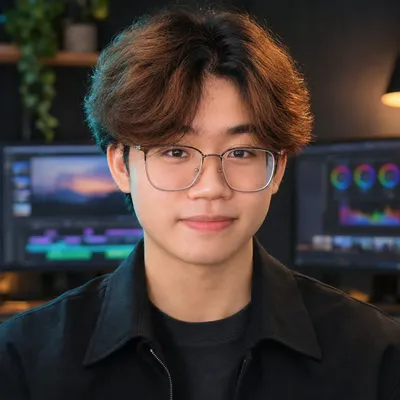
Edited by
Ngoc Giau T.
A short-form video editor in Ho Chi Minh City, Vietnam. AI-assisted tools speed up the rough cut and the motion work; every cut and every caption is still reviewed by me before it reaches you.
- Based in
- Ho Chi Minh City, Vietnam
- Time zone
- GMT+7 · edits while the US sleeps
- Edited in
- CapCut · Remotion · ffmpeg
- Workflow
- AI-assisted
- Every cut & caption
- Checked by hand
- Formats
- 9:16 · 1:1 · 16:9
- Revisions
- 1–2 rounds, by package
“I'd rather ask one more question than deliver the wrong edit.”
Post-credits scene
Send me one raw clip.
I'll edit 15 seconds of your own footage for free, so you can judge the style before you hire. Here's how:
- 01Reply to my proposal on Upwork, or invite me to your job.
- 02Paste a link to one raw clip (Google Drive, Dropbox or WeTransfer).
- 03Get a 15-second test edit back, free, and decide from there.